
뒤로
Turn off Discover in the Chrome app
Last updated :
News articles are displayed in the Chrome browser through a feature called "Google Discover." If you wish to turn off this feature, follow the settings below.
1. Disabling Google Discover in the Chrome app
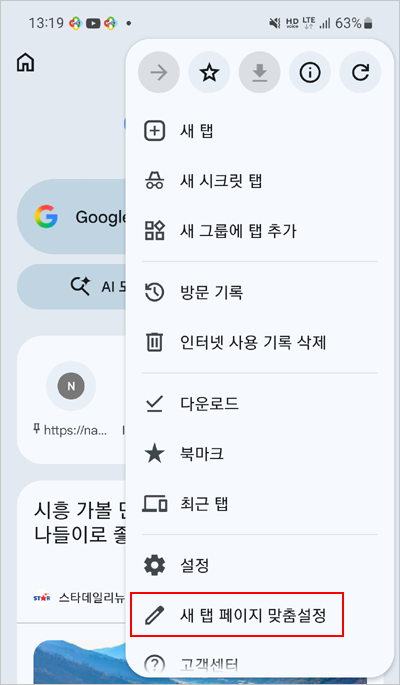
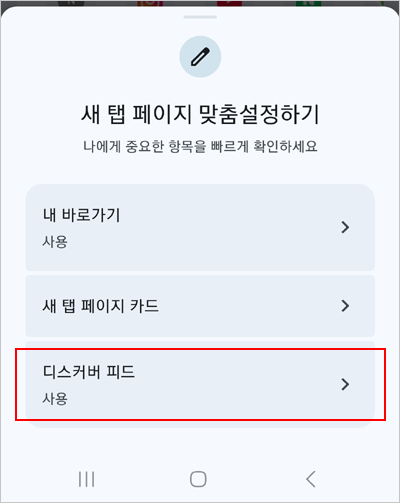
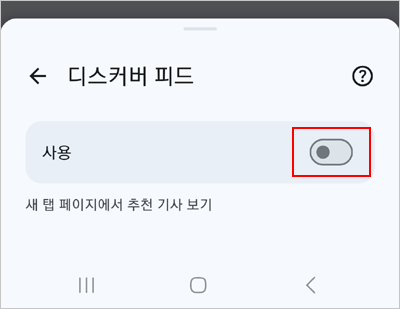
Launch the Chrome browser on your child's device → New Tab → Tap the  icon at the top right → Customize Chrome → Select Discover feed → Toggle the button to turn it off.
icon at the top right → Customize Chrome → Select Discover feed → Toggle the button to turn it off.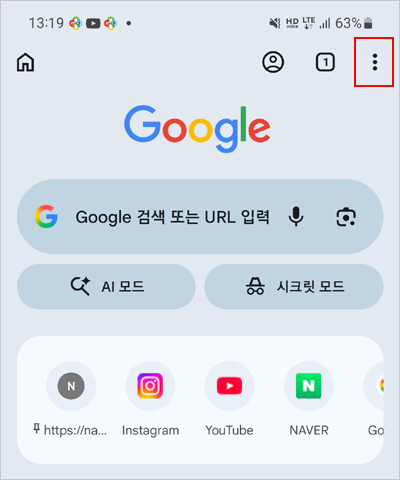
2. Turning on Chrome settings blocking
After completing the settings, you must enable the 'Block Chrome Settings' feature to ensure your child cannot arbitrarily re-enable the Discover feature in the Chrome browser.
Rules → Apps →  Labs → Block Chrome Settings → On
Labs → Block Chrome Settings → On
This feature is supported from Mobile Fence v4.4 onwards.