EC-2

Parent device connection guide (connect without permissions)  

Last updated :

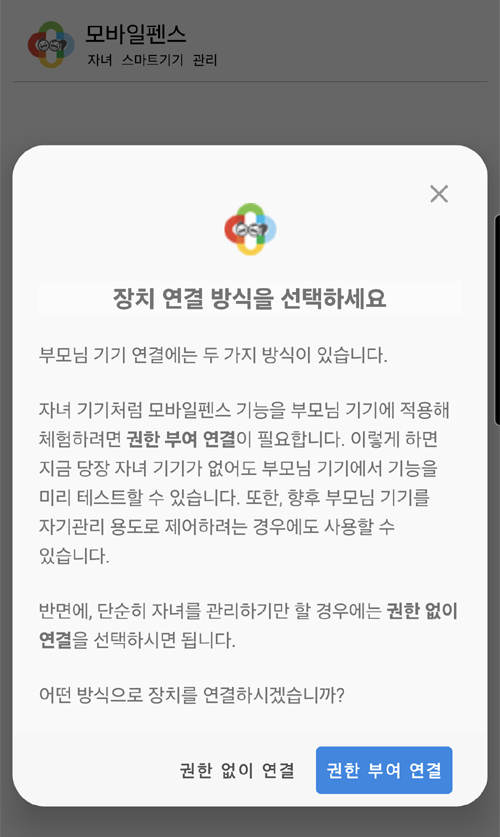
When connecting a parent device, choose one of the two methods depending on your purpose.


  • Connection with Authorization (Feature Trial/Self-Management)

    • Use this if you want to test Mobile Fence features in advance without a child's device.

    • Suitable for parents who want to manage their own smartphones (self-management).

  • Connection without Authorization (Child Management Only)

    • Select this when you want to manage your child without applying any restrictions to the parent device.

    • The connection process is very simple as it does not require any separate system permission settings.


Contact Us

Before inquiring...Have you been looking for this answer?
โ€ข How to block child disable Mobile Fence app?
โ€ข I want to know how to uninstall MobileFence app.
โ€ข Does a parentsโ€™ device get blocked?
โ€ข How to see the contents of Text?

An error has occurred while registering your question.
Your question has been successfully registered.
We will get back to you within 24 hours on weekdays. Thank you!

By providing related screens, we can process your inquiry more precisely and quickly.

Contact Us

Before inquiring...Have you been looking for this answer?
โ€ข How to block child disable Mobile Fence app?
โ€ข I want to know how to uninstall MobileFence app.
โ€ข Does a parentsโ€™ device get blocked?
โ€ข How to see the contents of Text?

An error has occurred while registering your question.
Your question has been successfully registered.
We will get back to you within 24 hours on weekdays. Thank you!

By providing related screens, we can process your inquiry more precisely and quickly.