
EC-2

Unblock apps in Google Family Link  

Last updated :

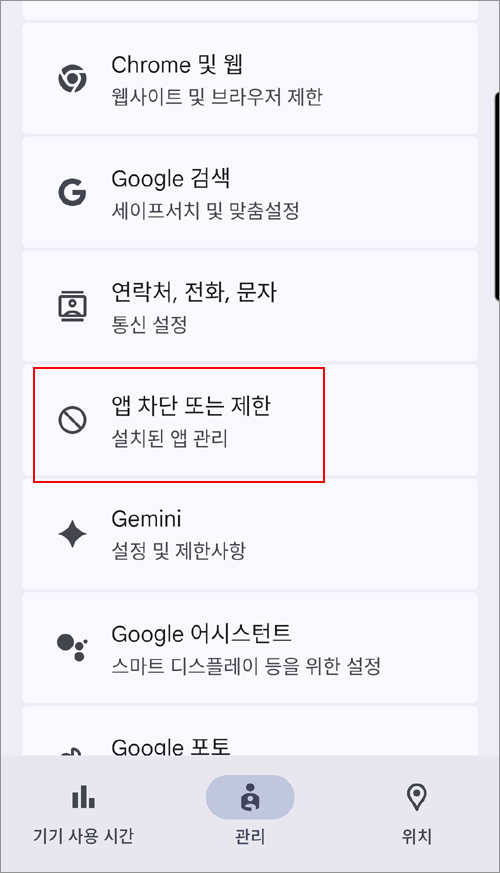
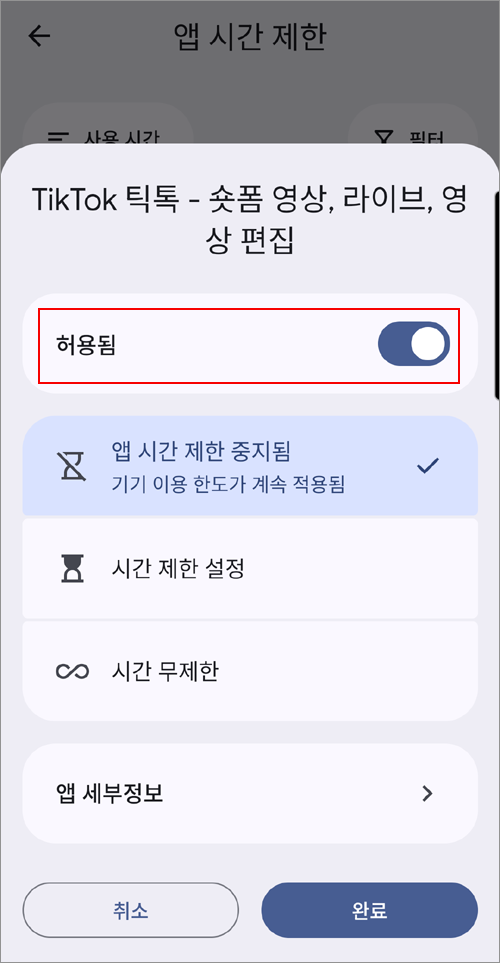
If Google Family Link is installed on your child's device and an app has been blocked, the icon for that app will not be visible on the device. The following explains how to unblock it.


Parent's device → Family Link → "Controls" tab at the bottom → App blocking or limits → Select the app to unblock → Change to Allow


Using Mobile Fence and Google Family Link together is not recommended.

When both apps attempt to control the device simultaneously, it may cause functional conflicts, app blocking errors, and malfunctions in usage limits.

Please refer to the help links below for instructions on how to delete the 'Family Link' app.

1) https://support.google.com/families/answer/9182020?hl=en  

2) https://jinibh.tistory.com/736


Contact Us

Before inquiring...Have you been looking for this answer?
โ€ข How to block child disable Mobile Fence app?
โ€ข I want to know how to uninstall MobileFence app.
โ€ข Does a parentsโ€™ device get blocked?
โ€ข How to see the contents of Text?

An error has occurred while registering your question.
Your question has been successfully registered.
We will get back to you within 24 hours on weekdays. Thank you!

By providing related screens, we can process your inquiry more precisely and quickly.

Contact Us

Before inquiring...Have you been looking for this answer?
โ€ข How to block child disable Mobile Fence app?
โ€ข I want to know how to uninstall MobileFence app.
โ€ข Does a parentsโ€™ device get blocked?
โ€ข How to see the contents of Text?

An error has occurred while registering your question.
Your question has been successfully registered.
We will get back to you within 24 hours on weekdays. Thank you!

By providing related screens, we can process your inquiry more precisely and quickly.